標題: How to setting Continuous printing for kitchen /bar printer(設置廚房單連續打印) [打印本頁] 作者:
support1 時間: 2018-9-12 09:46 標題: How to setting Continuous printing for kitchen /bar printer(設置廚房單連續打印)
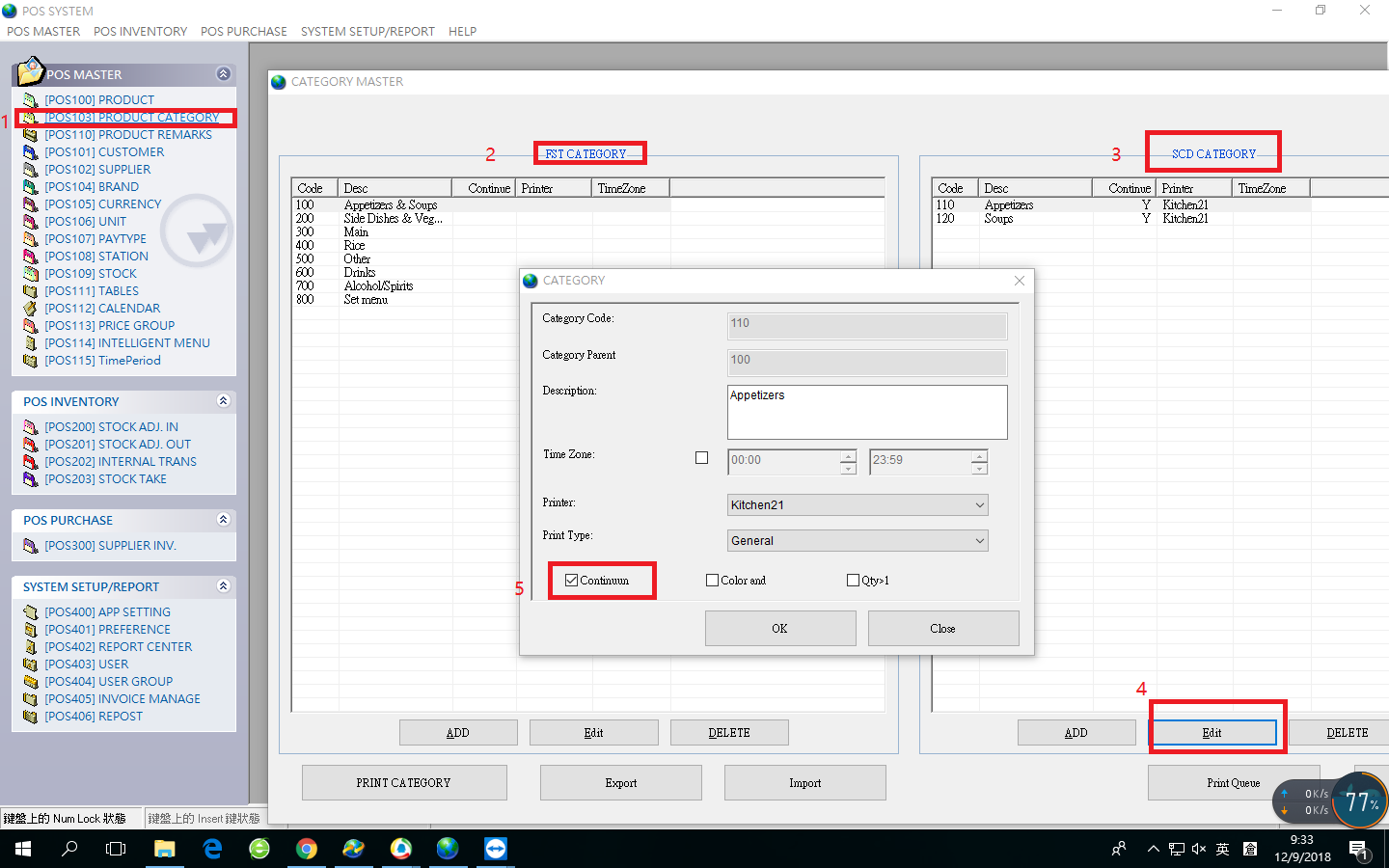
Pls. ref. below pic
請參照下圖:
1. open Rest Admin,click POS103(Product Category)
打開REST的后臺,點擊POS103(產品目錄)
2. select 1st Category
選擇第一類目
3 Then click 2nd Category which you want to set the continuous printing.
再選擇對應的需要更改成為連續打印的第二類目
4.Click Edit, and the display pop-up windows will been presented.
點擊編輯,之後會彈出一個顯示窗口
5.Then tick the box of "continuum".
點擊顯示窗口上面的"連續“的單選框。